How AI Changes WordPress Web Design Workflows
AI is not coming for your web design job. We have been watching these tools develop closely, and the reality is far more compelling than the headlines suggest. We are entering an era where the repetitive groundwork of web development, setting up custom post types, mapping relationships, and populating dummy data, takes minutes rather than hours. The designers who embrace this shift will not be replaced. They will simply become much faster.
📚 New to WordPress? Start with our WordPress Basics & Installation guide and read “What is WordPress?” A Beginner’s Guide. A Beginner’s Guide before exploring AI-powered workflows.
Primary sources
TL;DR: What You Need to Know
- AI automatically handles repetitive setup work, such as ACF configuration and data population.
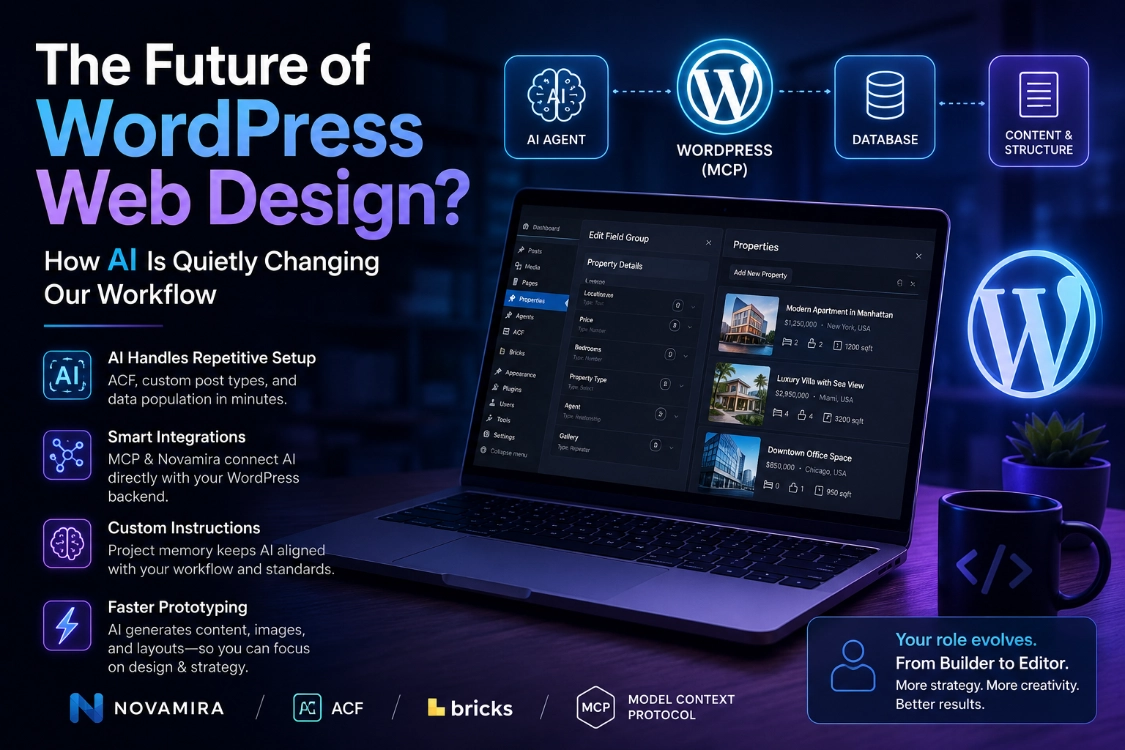
- Tools like Novamira and the Model Context Protocol let AI communicate directly with your WordPress backend.
- Custom instructions and project memory stop AI from ignoring your development standards.
- Your role shifts from builder to editor. Time saved on setup is reinvested into design and strategy.
1. From Manual Setup to Data-First Automation
Traditional complex WordPress projects involve significant manual clicking. Install Advanced Custom Fields, create post types manually, and add meta fields one by one. The new workflow flips the process entirely. Using tools like Novamira and the Model Context Protocol, you describe your data structure in plain English. Tell the AI to create a real estate site with properties, agents, and bidirectional relationships between them. The AI does not just write the code. It interfaces directly with your WordPress database via MCP to build those structures natively, giving you AI speed alongside the flexibility of the tools you already use, ACF, Bricks Builder, and your existing plugin stack.
2. The Power of Custom Instructions and Project Memory
AI without guidance creates technical debt. It makes its own choices, ignores your standards, and uses functions you specifically wanted to avoid. The solution is persistent custom instructions. In connectors like Novamira Pro, you set project-level rules that the AI follows consistently throughout the entire build.
- “Always use ACF for post types.”
- “Use BEM naming conventions for CSS.”
- “Prefer native Bricks elements over shortcodes.”
Building this persistent context stops hallucinations and suboptimal choices before they compound into larger problems later in the project.
3. Prototyping at Warp Speed
AI genuinely excels at prototyping. Instead of spending hours sourcing stock images and writing placeholder text, you instruct the AI to generate ten realistic property listings with location-specific details, pull relevant exterior and interior images from Pexels based on property type, and create estate agent profiles with professional headshots and contact information. Within minutes, a fully functional prototype sits ready for client review or layout testing. The bones of the site exist. Your job is to give it a soul.
4. The Human-in-the-Loop Reality Check
AI-generated design is currently functional but rarely beautiful. The AI builds the data architecture and logic reliably. Visual hierarchy, nuanced UX decisions, and accessibility standards still require a human eye. Your role shifts from creating every element from scratch to refining what the AI produces, correcting broken links, fixing CSS placement errors, and ensuring performance best practices apply throughout.
💡 Pro Tip: Treat every AI-generated prototype as a first draft, not a finished product. The time you save on structure and data setup should flow directly into higher-level design refinement and client strategy work.
ℹ️ Note: Novamira is designed for development and staging environments. Always work with a full backup active before running AI agents against any WordPress installation.
Conclusion
AI is the future of WordPress web design, but not in the way the loudest voices online suggest. No one-click solution replaces the designer. Instead, a sophisticated engine now exists that requires a competent pilot to produce excellent results. Embrace these now, and you won’t fall behind. For more on mastering the tools shaping tomorrow’s WordPress workflow, explore the latest tutorials at CreatePressHub.