FluentAuth 3.0: Free WordPress 2FA and Passkeys Guide
WordPress security guide · Updated September 2026
FluentAuth 3.0 brings passkeys, authenticator-app verification, login limits, activity logs, and file-change checks into one free WordPress plugin. That sounds like a complete security stack, but it is not. Here’s what the latest release does, how to set it up without locking yourself out, and where you still need other protections.
The short answer
FluentAuth is a practical choice for improving WordPress sign-in security. Start with login limits and a second factor for administrators, confirm recovery works, then add optional conveniences such as magic links. Its file scans and checklist are useful signals, not a substitute for backups, patching, a firewall, or an incident-response plan.
Our assessment combines the WPTuts video walkthrough with FluentAuth’s current documentation. We have not performed an independent penetration test or performance benchmark.
What changed in FluentAuth 3.0?
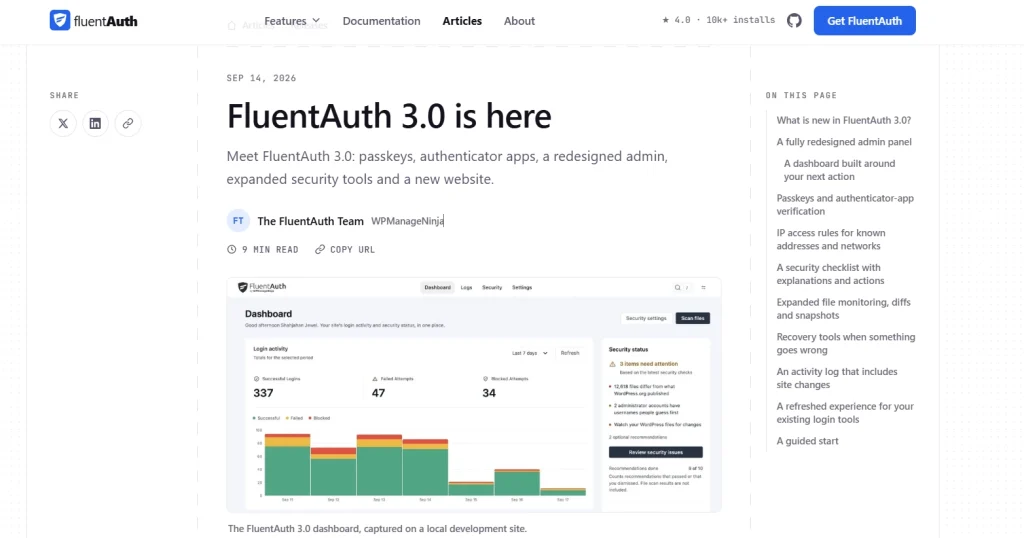
The September 2026 release adds passkey verification, authenticator-app codes, recovery codes, a redesigned administration area, IP access rules, a security findings checklist, expanded file monitoring, and recovery tools. It also extends activity logging to plugin events. These additions matter because a secure login is more than a harder password: administrators need a second factor, a way to recover access, and enough visibility to investigate unusual changes. FluentAuth’s 3.0 release notes distinguish those new features from older ones.
Magic login links, social sign-in, Google One Tap, redirect rules, custom login forms, system emails, and a login-page designer were already available. The refreshed interface makes them easier to find, but they are not all new 3.0 features.

Protect
Login controls
Limit repeated attempts, require a second factor for selected roles, and apply IP rules when you know which networks should reach privileged accounts.
Observe
Activity and findings
Review successful and blocked logins, plugin changes, and configuration findings. A warning deserves investigation, not an assumption that the site was hacked.
Recover
Access recovery
Keep recovery codes, a second device, or another tested route before enforcing passkeys. The recovery screen can revoke sessions and guide follow-up actions.
Improve UX
Flexible sign-in
Magic links and social login may reduce password friction for members and customers, while administrators retain stronger verification.
Passkey, authenticator app, or email code?

The best method depends on the account and its recovery path. An email code is straightforward but depends on mailbox access and reliable outgoing mail. A time-based code from an authenticator app gives a separate device check. A passkey uses a credential tied to the site’s domain and can be completed with a compatible device, password manager, or security key. FluentAuth describes passkeys as part of its verification flow, so test the exact sign-in experience on your site before telling users it replaces every password step. See the official 2FA guide and passkey setup guide.
Do this before enforcing 2FA: enroll your own administrator account, store recovery codes outside WordPress, and test a second route in a private browser window. If you use email codes, send a real test message. A working SMTP plugin alone does not prove the message reaches every user’s inbox.
A safer first-day setup, step by step
- Back up and check access. Ensure you can restore the site and contact a second administrator or your host if the login settings fail.
- Run the guided setup. Review each setting rather than accepting it blindly. The wizard’s proposed changes are not saved if you skip it.
- Set an attempt limit. FluentAuth’s documented default is five failed attempts per IP within 30 minutes. Adjust only if your team’s shared network makes that too strict.
- Turn on a second factor for privileged roles. Start with administrators, verify that they can enroll and save recovery codes, then decide whether editors and authors should be required too.
- Verify visitor IP detection. Sites behind Cloudflare or another reverse proxy must handle client IPs correctly before you can trust IP rules and logs.
- Test from a separate connection. Use a private browser window and a phone on mobile data for a blocked-attempt test so you do not lock out your working session.
- Review the logs and alerts. Confirm that a successful login, blocked attempt, and notification appear where expected.
This order follows FluentAuth’s first-day setup documentation, with an added emphasis on recoverability and real mail delivery.
File monitoring is useful, but understand the boundary.
FluentAuth can compare WordPress core and supported directory plugins and themes with official references. For premium or custom extensions, it can create baseline snapshots and flag later changes. A changed file can be a normal update, a developer edit, or something malicious. Treat a finding as a lead to investigate, not proof of compromise.
Manual scans run locally without connecting to FluentAuth’s optional alerts service. Scheduled monitoring and email alerts require that connection. According to the vendor, the service receives scan-result paths and site metadata, not file contents or the database. Create a baseline only after you trust the current files: a snapshot preserves existing problems as well as legitimate code. Please review the file integrity documentation before proceeding with a restore action.
Three settings that can break a working site
1. Blocking application passwords
WordPress application passwords are used by some REST API clients, mobile apps, and AI or MCP connections. FluentAuth deliberately does not include disabling them in its recommended settings. If you block them without checking connected services, those integrations can stop authenticating. Review active application passwords and test each workflow first. Official core security guidance.
2. Treating the XML-RPC switch as a complete endpoint block
The plugin’s switch refuses certain authenticated XML-RPC methods and removes pingbacks. It does not guarantee that every request xmlrpc.php is rejected. If your security policy needs an endpoint-wide block, coordinate with your host and verify compatibility.
3. Restricting administrators by IP too early
An IP allow list can help a team with a stable office or VPN connection. It is brittle for people with changing home or mobile addresses. Confirm the proxy configuration, recovery route, and every administrator’s access before enforcing it.
Is FluentAuth 3.0 really free?
At the time of this update, the $0 plugin includes the features discussed here. FluentAuth says it may introduce a Pro tier in the future, while the features currently shown on its site will remain free. That is more precise than saying there will never be a paid version. Check the official product and pricing information before relying on a long-term plan assumption.
Who should use it?
Small sites and blogs: Start with login limits, administrator 2FA, and tested recovery. Keep plugin updates, backups, and your existing host protections.
Membership and WooCommerce sites: Consider magic links or social login for customer convenience, but test registration emails, redirects, and checkout-account flows on staging first. Do not force a new login method on every customer without a support plan.
Agencies and connected workflows: Audit application passwords, API clients, shared office IPs, and proxy settings before applying hardening toggles across client sites. Use a staging copy and document a rollback path.
FluentAuth is best viewed as a login and visibility layer, not a complete replacement for a web application firewall, malware remediation, backups, or hosting security. For the broader checklist, see our WordPress security basics guide.
Frequently asked questions
Can FluentAuth replace Wordfence or another full security plugin?
Not necessarily. Its strongest focus is authentication, login controls, and related monitoring. Compare the protections you actually use before removing a firewall, malware scanner, or backup system.
Does a passkey remove the need for recovery codes?
No. A lost device or inaccessible password manager can still lock an account out. Register a second method or store recovery codes safely, then test the fallback.
Does a file-change alert mean my site is infected?
No. Updates and legitimate edits change files too. Confirm what changed, compare against a trusted source, and review logs before restoring or deleting anything.
Will magic login bypass required device verification?
According to FluentAuth, a magic link proves access to the email inbox, so an extra email code is skipped. A required device factor still applies.
Bottom line
FluentAuth 3.0 makes strong WordPress login practices more approachable: role-based 2FA, passkeys, recovery options, and clearer activity records now live together in a free plugin. The safest setup is incremental. Protect one administrator, test recovery and email, inspect the logs, and then expand the policy. Keep independent backups and a broader security plan in place.
Sources and editorial note
We used the WPTuts walkthrough as a feature tour, then checked specific claims against FluentAuth’s release notes, setup guide, hardening documentation, and file-monitoring documentation. Product descriptions are vendor-documented, not the result of our own security audit. Feature availability can change after September 19, 2026.