I created 200 tags for a 50-page blog because I thought “more is better.” Google started indexing thin tag archive pages with one post each, diluting my site authority. My rankings dropped across the board, and cleaning up the mess took two months of tedious database work.
The digital landscape of 2026 demands precision in content architecture. Haphazard organization no longer suffices because for any serious WordPress deployment, from corporate blogs to e-commerce storefronts, a robust understanding and disciplined application of categories and tags is not optional. Understanding how to use categories and tags in WordPress properly is fundamental to your site’s success. This post will detail their distinct roles, strategic deployment, and the consequential impact on user experience and search engine visibility. Mastering these core taxonomies is as critical as the initial WordPress basics and installation itself.
WordPress Categories: The Architectural Beams of Your Content
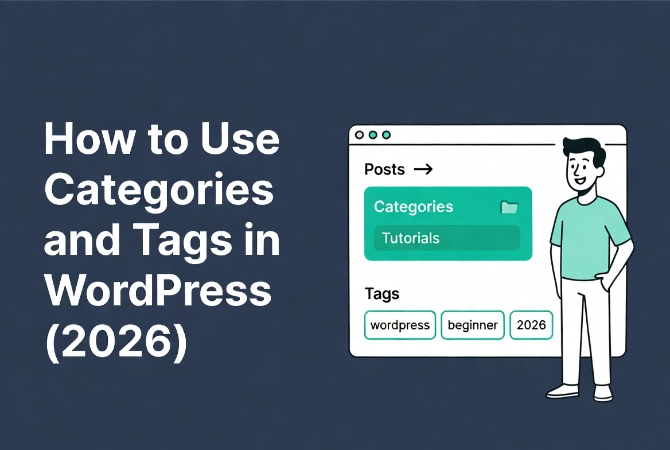
Think of categories as the broad sections of a library or the chapters of a comprehensive textbook.
Categories define the overarching themes of your content. WordPress categories are hierarchical, which means you can establish parent categories and nest multiple child categories beneath them.
This creates a logical, structured pathway through your site’s information.
Hierarchical Category Structure Example
For instance, a technology blog might have a main category “Software Development.”
Underneath it, you could have “Frontend Development,” “Backend Development,” and “DevOps” as child categories. Each child category offers a more specific lens while retaining its relationship to the broader subject.
This structure is paramount for user navigation because visitors can quickly ascertain the scope of your content and drill down into areas of interest.
Strategic Category Planning
The strategic planning of your categories is an upfront exercise that pays dividends over time.
Before writing a single post, define your primary content pillars. Aim for a manageable number of top-level categories, typically between 5 and 10. Too many primary categories dilute their purpose.
Conversely, too few make navigation overly broad. Research suggests a clear, limited set of top-level categories significantly improves site usability, reducing cognitive load for users by up to 30%.
This directly correlates to lower bounce rates and increased time on site.
Managing WordPress Categories
WordPress makes category management straightforward.
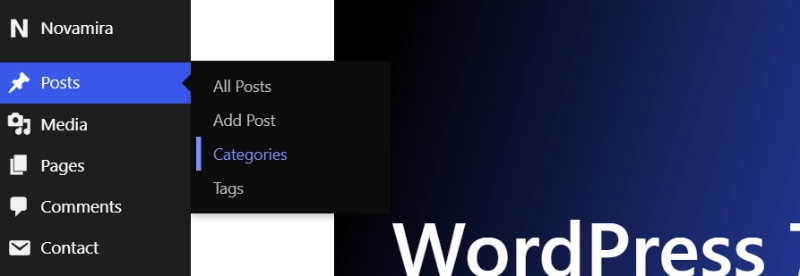
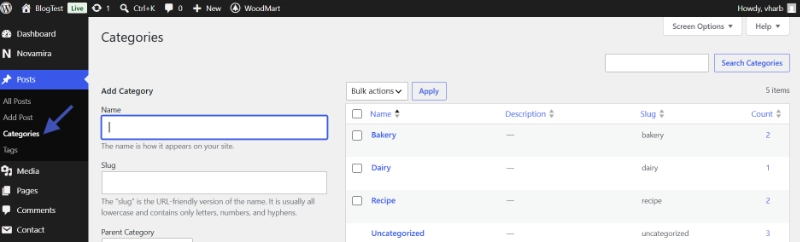
Access “Posts” and “Categories” in your admin dashboard. Here, you can create new categories, assign parent categories, and even edit slugs for SEO purposes.
The default category, “Uncategorized,” should be renamed to something relevant to your niche. Leaving posts in “Uncategorized” projects gives an image of neglect and disorganization, hindering both user perception and search engine indexing.
WordPress Tags: The Granular Indexing System
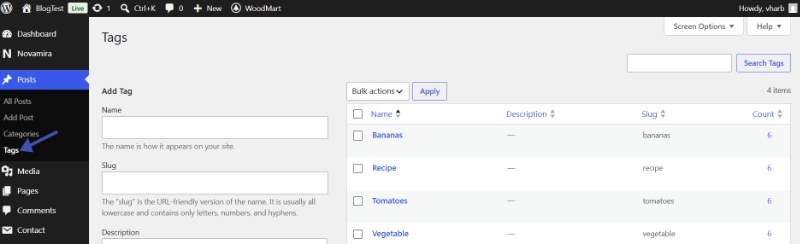
While categories provide the structural framework, tags offer micro-level indexing.
Tags are non-hierarchical, acting as specific keywords or phrases that describe the minute details within a post. Imagine them as the index entries at the back of a detailed academic paper.
They don’t dictate the overall chapter, but they pinpoint exact mentions of specific concepts.
Effective Tag Usage Examples
Consider our technology blog again.
A post under “Frontend Development” might discuss “React Hooks,” “CSS-in-JS,” or “State Management.” These are excellent candidates for tags because they are highly specific.
Users searching for very particular topics can find relevant content through these tags, even if the primary category is broad.
How Tags Enhance Content Discoverability
Tags enhance content discoverability significantly.
They group related discussions across different categories, creating new, often unexpected, content clusters. Effective tag usage hinges on specificity and control.
Avoid using tags that are too broad (e.g., “Technology”) or too narrow (e.g., a unique phrase used only once). A tag should describe a concept or entity that could appear in multiple posts, allowing for cross-referencing.
Creating Tags in WordPress
Creating tags is simple and intuitive.
In the post editor, you’ll find the Tags meta box. Type in your desired tags, separated by commas. WordPress automatically adds them upon publishing.
You can also manage all existing tags under “Posts” and “Tags,” similar to categories.
Strategic Application: WordPress Categories Versus Tags
Understanding the fundamental difference between categories and tags is paramount for effective content management.
This distinction influences user experience, site structure, and search engine optimization.
| Feature | Categories | Tags |
|---|---|---|
| Hierarchy | Hierarchical (Parent/Child structure) | Non-hierarchical (Flat structure) |
| Scope | Broad topics, main content sections | Specific details, keywords, micro-themes |
| Mandatory? | Required for every post (defaults to “Uncategorized”) | Optional |
| Quantity per Post | Typically 1-3 (one primary, possibly secondary) | Multiple (5-15 common, depending on complexity) |
| Navigation Role | Primary navigation, site architecture | Content discovery, related post suggestions |
SEO Impact of WordPress Categories and Tags

When considering search engine optimization, categories provide strong signals about the primary topics covered on your site.
Their URLs are often part of the canonical structure, informing search engines about the organizational hierarchy. Tags, conversely, provide additional relevance signals, indicating specific discussions within those broader topics.
Avoiding Thin Content Issues
Over-reliance on tags can lead to “thin content” issues if tag archive pages have only one or two posts.
Each tag archive page should ideally offer a collection of related, valuable content. This proves especially important for maintaining clean indexation and avoiding duplicate content penalties.
Topical Authority and Search Rankings
A well-architected content taxonomy directly impacts how search engines crawl and understand your website.
According to Google’s Search Quality Rater Guidelines, content organization is a factor in evaluating overall site quality. A clear structure assists bots in identifying topical authority, a crucial ranking signal in 2026.
WordPress Categories and Tags Implementation Best Practices
Consistency is non-negotiable in taxonomy management.
Establish clear guidelines for your content creators regarding category and tag usage. This prevents redundancy (e.g., “SEO” vs. “Search Engine Optimization” as separate tags) and ensures a predictable structure for users and search engines.
Regular Taxonomy Audits
Regular audits of your categories and tags are necessary for maintaining site health.
Remove unused tags, consolidate similar terms, and re-evaluate your category structure as your content evolves. This is a critical administrative task, often handled by users with specific WordPress user roles and permissions, such as editors or administrators.
Avoiding Common Taxonomy Pitfalls
Avoid keyword stuffing in tags at all costs.
This practice, once common, now harms search rankings. Focus on accurate, descriptive terms rather than an exhaustive list of every conceivable keyword.
Also, avoid using a single category for every post or creating a tag for every unique word. Such approaches negate the purpose of these taxonomies.
User-Centered Taxonomy Design
Consider the user journey carefully when planning your structure.
Do your categories and tags genuinely help users find what they need, or do they add confusion? User feedback, supported by analytics data (what internal search terms are most common and which category/tag pages are visited most), should inform your taxonomy strategy.
A complex category structure or an overwhelming number of tags will deter exploration. Simplicity and clarity are paramount.
Frequently Asked Questions About WordPress Categories and Tags
What’s the difference between WordPress categories and tags?
Categories are hierarchical, broad content sections that define your site’s main topics (required for every post). Tags are non-hierarchical, specific keywords describing post details (optional). Categories are for structure; tags are for discovery.
How many categories should I have in WordPress?
Aim for 5-10 top-level categories. Too many dilute their purpose and confuse navigation. Too few makes everything too broad. Choose categories that represent your core content pillars and can accommodate child subcategories.
How many tags should I use per WordPress post?
Use 5-15 tags per post depending on length and complexity. Tags should be specific, reusable concepts that appear in multiple posts. Avoid creating unique tags used only once, and don’t keyword stuff.
Do WordPress categories and tags affect SEO?
Yes, significantly. Categories signal primary topics to search engines and often appear in URL structures. Tags provide additional relevance signals. However, too many thin tag archive pages (1-2 posts) can harm SEO through thin content issues.
Can I change WordPress categories without losing SEO?
Yes, but carefully. If categories are in your permalink structure, use 301 redirects from old category URLs to new ones. Update internal links. Avoid frequent changes, as they can temporarily confuse search engines about your site structure.
Should I delete unused WordPress tags?
Yes, absolutely. Unused tags create empty archive pages that waste crawl budget and can be indexed as thin content. Regularly audit and delete tags with zero posts or consolidate similar tags into a controlled vocabulary.
Additional Resources for WordPress Content Organization
Continue building your WordPress taxonomy expertise with these essential guides:
- Master the foundation in WordPress Basics and Installation
- Understand content types through WordPress Posts vs. Pages: Key Differences
- Control access via Understanding WordPress User Roles and Permissions
- Optimize URLs using WordPress Permalinks: The Ultimate Guide
Categories and tags are more than just organizational tools because they are foundational elements of a well-structured, discoverable, and user-friendly WordPress website. A thoughtful taxonomy strategy enhances navigation, strengthens your site’s topical authority for search engines, and ultimately improves the overall experience for your audience. Dedicate the necessary planning to these elements early in your site’s lifecycle, and maintain that discipline as your content library grows. This precision in content architecture represents a hallmark of any successful digital presence and remains a core tenet of effective site management. Return to WordPress Basics and Installation whenever you need to review the foundational concepts that make professional WordPress site management possible.